REFERENCE FILM
THE MARIGOLD BRIDGE9:16 ✦ 00:08
“No lo dejen solito.”Don’t let him walk alone.

Original reel:@ia_chiomora / MakeViral ↗

MARIGOLD BRIDGE ✦ DÍA DE MUERTOS

Marigold Bridge AI
A way to remember.

Marigold Bridge AI brings a treasured portrait into a warm, animated scene. A familiar face, a bridge of golden petals, and a quiet moment of wonder. Begin with one clear photo of someone you miss.

One person, one photoVertical 9:16 sceneNo prompt to write
Your Marigold Bridge AI videoPhoto upload
Drop a photo, or browse files
One clear face. A well-preserved old photo works too.

JPG, PNG or WebP · Up to 10 MB

CHOOSE PICTURE QUALITY
8 seconds · 9:16 · MP4Video cost: 67 credits

Sign in before uploading. You will return to this page.

Your photo is uploaded for video creation. Uploading uses no video credits.

ONE PHOTO. A GENTLE JOURNEY.

How to make a Marigold Bridge AI video

Start with the photograph, choose your settings, then review the result. Marigold Bridge AI gives the scene a direction so you can focus on the person.

01 — 03
01

Choose a familiar photograph

For Marigold Bridge AI, choose a portrait that feels like them: their usual smile, familiar glasses, or a favorite shirt. One person should be clearly visible. Crop other faces out before selecting the image. A sharp original gives Marigold Bridge AI more useful detail than a screenshot of a screenshot.

02

Choose your picture quality

Select 720p for everyday viewing or 1080p for a larger screen. Marigold Bridge AI uses a vertical composition suited to a phone. Resolution describes the picture size; it cannot recover missing facial details. Before submitting a Marigold Bridge AI request, check the selected photo, settings, and any displayed credit cost.

03

Review it before sharing

Watch the whole Marigold Bridge AI clip before choosing what to share. Look at the face, hands, clothing, and movement, especially during the petal gathering. Keep the version that feels appropriate to you. A Marigold Bridge AI video can stay within the family; sharing it publicly is entirely your choice.

THE SCENE · THREE QUIET MOMENTS

The Marigold Bridge AI scene

The reference film follows a simple sequence, with time to notice the face and the flowers. Marigold Bridge AI takes its visual direction from these moments.
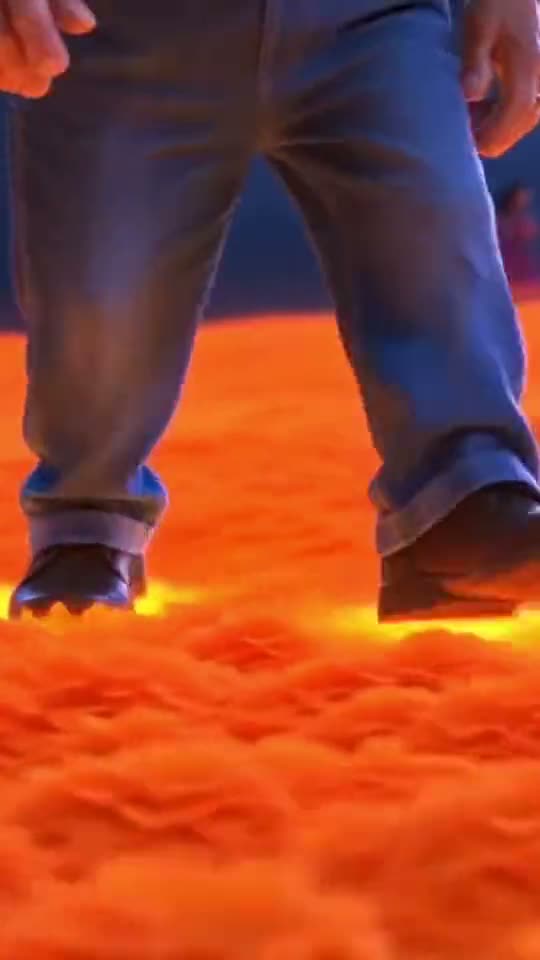
Animated character walking on glowing orange petals01 · THE FIRST STEPS

Walk into the light

The Marigold Bridge AI scene opens beneath a deep blue sky. An animated figure takes careful steps across glowing orange petals, with the warm light close to their feet. The feeling is gentle and unhurried. In Marigold Bridge AI, the floral setting supports the portrait without needing a busy backdrop.
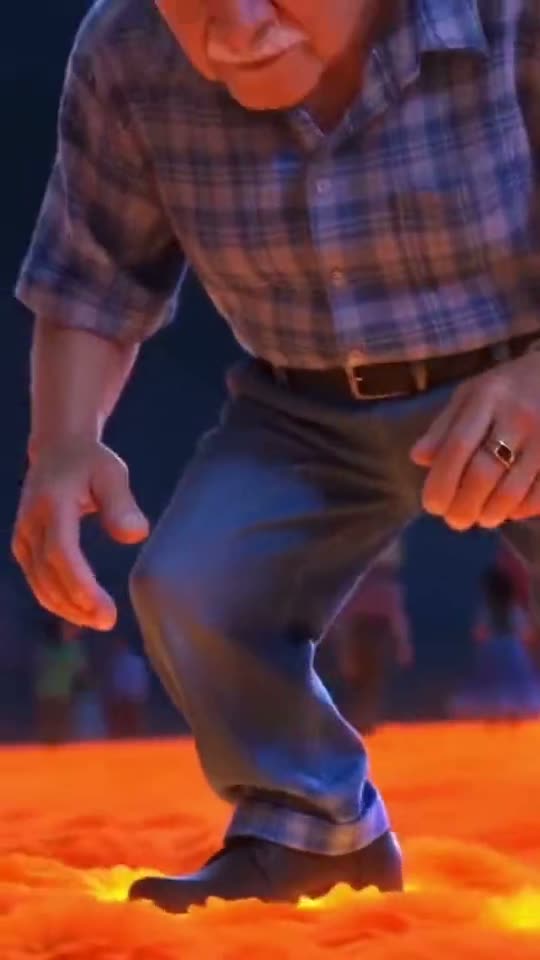
Character crouching to gather marigold petals02 · THE PETALS

Gather something golden

Next comes the central Marigold Bridge AI gesture: slowing down, bending toward the flowers, and gathering petals in cupped hands. This moment brings the face and hands into closer view. Marigold Bridge AI aims for a soft animated look, though hand shapes and facial details can vary between generated versions.
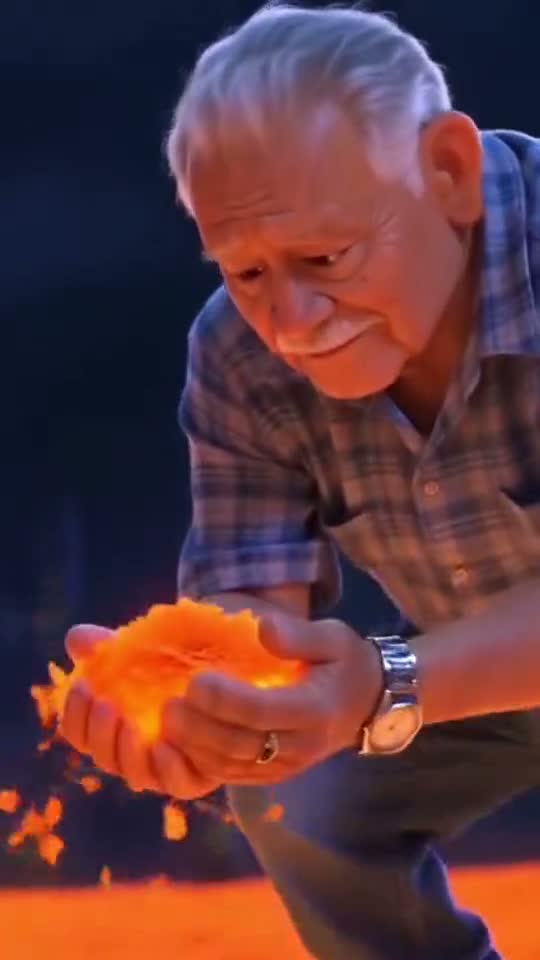
Character holding glowing petals with a gentle smile03 · THE SMILE

Hold a moment of warmth

The Marigold Bridge AI reference ends with the character holding petals and smiling gently. The light stays warm as a few petals drift through the scene. This is the ending shown here. Marigold Bridge AI does not promise an exact copy of the reference performance or every expression in it.

Reference footage by @ia_chiomora, shown via MakeViral. These frames illustrate the style; they are not results generated by this website.

A PATH OF REMEMBRANCE

What the flowers stand for

Marigold Bridge AI draws on the glowing flower-bridge imagery familiar from Coco and Día de Muertos storytelling. Orange petals, a dark sky, and warm light create a setting for remembrance. You do not need to recreate a film character or follow a particular tradition to appreciate the image. A Marigold Bridge AI portrait can simply be a personal way to express that someone is remembered. Let your own family’s wishes guide how you use it.

“No lo dejen solito.”

“Don’t leave him alone.” The phrase accompanying the trend expresses companionship. Marigold Bridge AI offers a creative tribute based on a photograph. Choose words and imagery that respect your family’s beliefs and the meaning you want to give it.

KEEP THE FAMILIAR DETAILS

A better starting photograph

  • Use one clear face. Marigold Bridge AI works from what the image shows, so avoid sunglasses, deep shadows, and anything covering important facial features.
  • Keep useful clothing details. A waist-up portrait gives Marigold Bridge AI more information about an outfit than a tightly cropped face. Leave some space around the head.
  • Photograph old prints carefully. Lay the print flat, use even light, and avoid reflections. Marigold Bridge AI cannot reliably reconstruct details lost to severe blur or damage.
  • Keep the original file. Avoid strong beauty filters and repeated compression. For Marigold Bridge AI, a natural expression and recognizable features matter more than a polished background.
If others share the memory, ask before posting. Some relatives may enjoy a Marigold Bridge AI tribute; others may prefer the original photograph. There is no need to rush that decision.
MAKE ROOM FOR THE PERSON

A tribute that feels personal

Choose details you recognize

A portrait does not have to be formal to suit Marigold Bridge AI. A familiar cardigan, a hairstyle, or the glasses someone wore every day may mean more than a studio pose. Choose the image with those details in mind. Marigold Bridge AI uses the photograph as a visual starting point, so check that the selected file shows the person as you want to remember them.

Add your own words when sharing

A short, personal caption can give a Marigold Bridge AI clip context. Mention a habit, a place, or a small memory that belongs to your family. You do not need dramatic wording or a public explanation of your loss. If you share Marigold Bridge AI footage, keep any AI disclosure required by the platform so viewers understand how the scene was made.

A FEW THINGS TO KNOW

Marigold Bridge AI questions

Practical answers before you choose a portrait.

What is Marigold Bridge AI?

Marigold Bridge AI is a photo-based way to create an animated tribute on a glowing flower bridge. It pairs a recognizable portrait with a gentle walking and petal-gathering sequence. The result is an artistic interpretation of a person, rather than restored footage from their life.

Can Marigold Bridge AI use an old photograph?

Yes, you can select a clear scan or a glare-free photograph of a print. Marigold Bridge AI may interpret missing colors and details differently from the original person. Keep the untouched photograph separately and review skin tone, hair, and clothing before sharing any result.

Does Marigold Bridge AI include a golden frame?

The sequence shown here ends on the bridge with petals in the character’s hands. A golden-frame portrait ending is not part of this scene. If that matters to your tribute, you can add a photograph afterward using a separate editor.

Will the face look exactly like the photo?

Marigold Bridge AI aims to retain recognizable features within an animated style. It cannot guarantee identical facial details, age appearance, expressions, or accessories. Review the result carefully, and avoid treating an AI expression as something the person actually did or felt.

Do I need to write a Marigold Bridge AI prompt?

The scene direction is already defined: a flower bridge, gentle movement, and a handful of glowing petals. Marigold Bridge AI therefore starts with photo selection rather than a blank prompt. Choosing a clear source image is the most useful preparation you can make.

Can Marigold Bridge AI use a group photo?

Crop it to one person first, leaving their whole face visible. Marigold Bridge AI is presented here as a single-person scene. If you want to remember several relatives, separate portraits make it easier to review each person’s appearance without confusing the subject.

How do I review a Marigold Bridge AI video?

Watch the Marigold Bridge AI clip all the way through. Check facial consistency, fingers, posture, and clothing, then consider whether the tribute feels right for its audience. Share privately first if you are unsure how other family members would feel about an animated portrait.

Is Marigold Bridge AI connected to Pixar or Disney?

No affiliation or endorsement is claimed. Marigold Bridge AI describes the flower-bridge theme shown on this page. The scene uses an animated interpretation of your chosen portrait, and the reference reel is separately credited to its creator.

A small light for someone you remember.

Begin your Marigold Bridge AI tribute with a photograph that feels familiar. Take your time, choose thoughtfully, and keep the memory personal.

Choose my photograph